Timesheets your clients approve and nobody has to chase
Workers fill in their hours or days on any phone. The right person at the client approves them. Reminders go out on their own. You get approved timesheets for payroll and draft invoices in Xero, all with your logo on.
Pay only for workers who record time that month. The first is free, then from £5 down to £1 per worker per month.
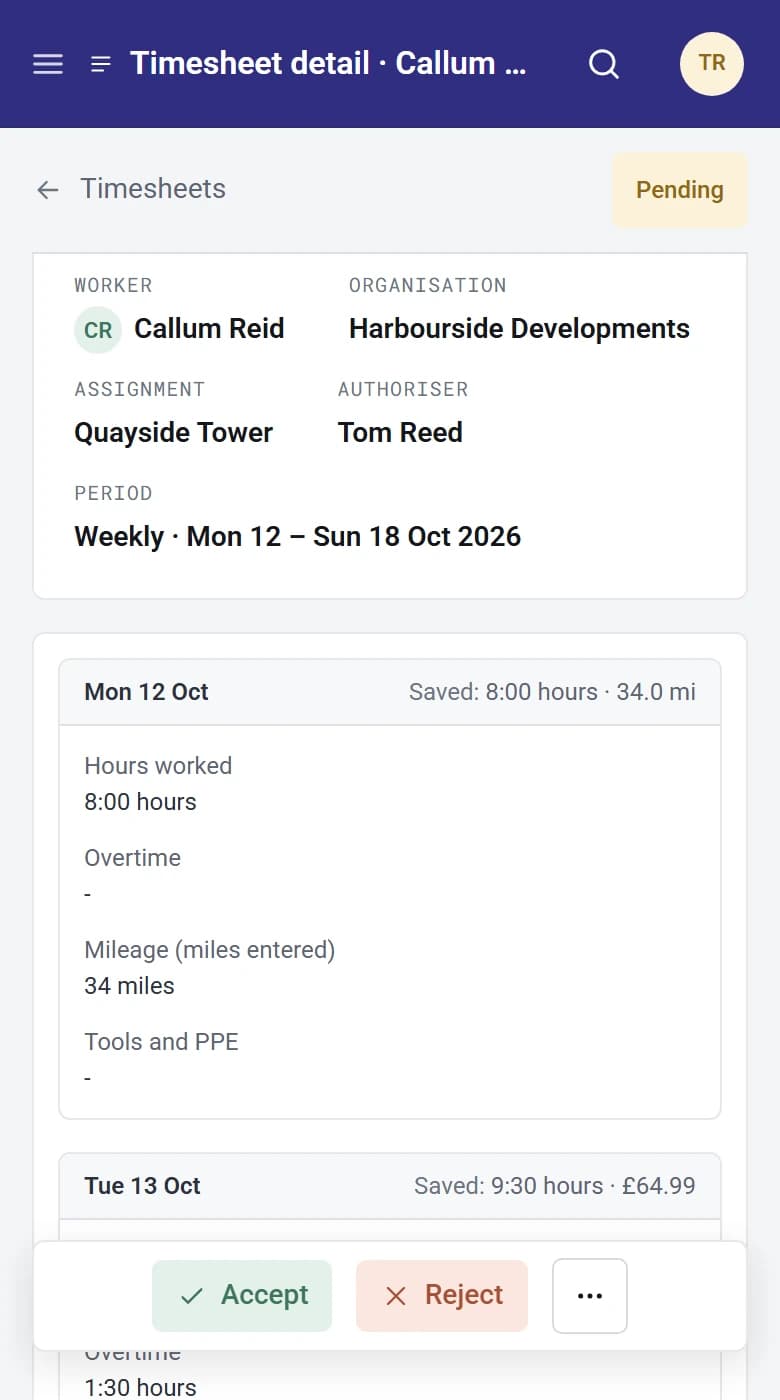
Who does what
Three people. One timesheet.
Worker
Callum Reid
Fills in each period’s timesheet, saves a draft, sends it. Sees what is missing, pending or sent back.
Client
Tom Reed, Harbourside Developments
Gets an email with a button to the timesheet. Approves or sends it back with a reason, one at a time, from the list or in bulk.
Agency
Hannah Price, Indigo Recruitment
Sets up templates and rates, watches what is missing, chases in one click, steps in when needed, sends approved time to payroll and Xero.
How it works
Set it up once
Pick a template, such as weekly hours or monthly day rate, and set pay and charge rates for each worker.
Workers fill it in
Each period’s timesheet is already waiting for them, and reminders go out before and after your cut-off.
The client approves
One person or a chain of up to five, chased automatically.
You get paid
Approved timesheets go to payroll as PDFs and spreadsheets, and to Xero as draft invoices.
Who authorises?
A single person decidesMost common
Worker
Callum Reid
Sends timesheet
Authoriser
Tom Reed
Site manager
Result
Accepted
Locked
Payroll
PDF and spreadsheet
Xero
Draft invoice per client
The timesheet goes to one person, who accepts it or sends it back with a reason. This is how most agencies work.
Each authoriser is reminded on your schedule. If one goes quiet, it moves to their backup.
These are just the common set-ups. Each timesheet template can authorise its own way, or you can decide for each worker as you add them, so one client can sign off with a single manager while another runs a chain of five.
No more chasing
Missing timesheets are created for you, and up to three reminders go to workers and authorisers on your schedule.
Approval your clients will use
Branded emails, a one-click button, and authorisation chains that match how each client works.
Ready for payroll and invoicing
Pay and charge rates are locked when the timesheet is sent, so payroll, invoices and reports all agree.
Quick to fill in
- Working hours are filled in for the worker in advance.
- Copy one day onto another, or copy a previous timesheet.
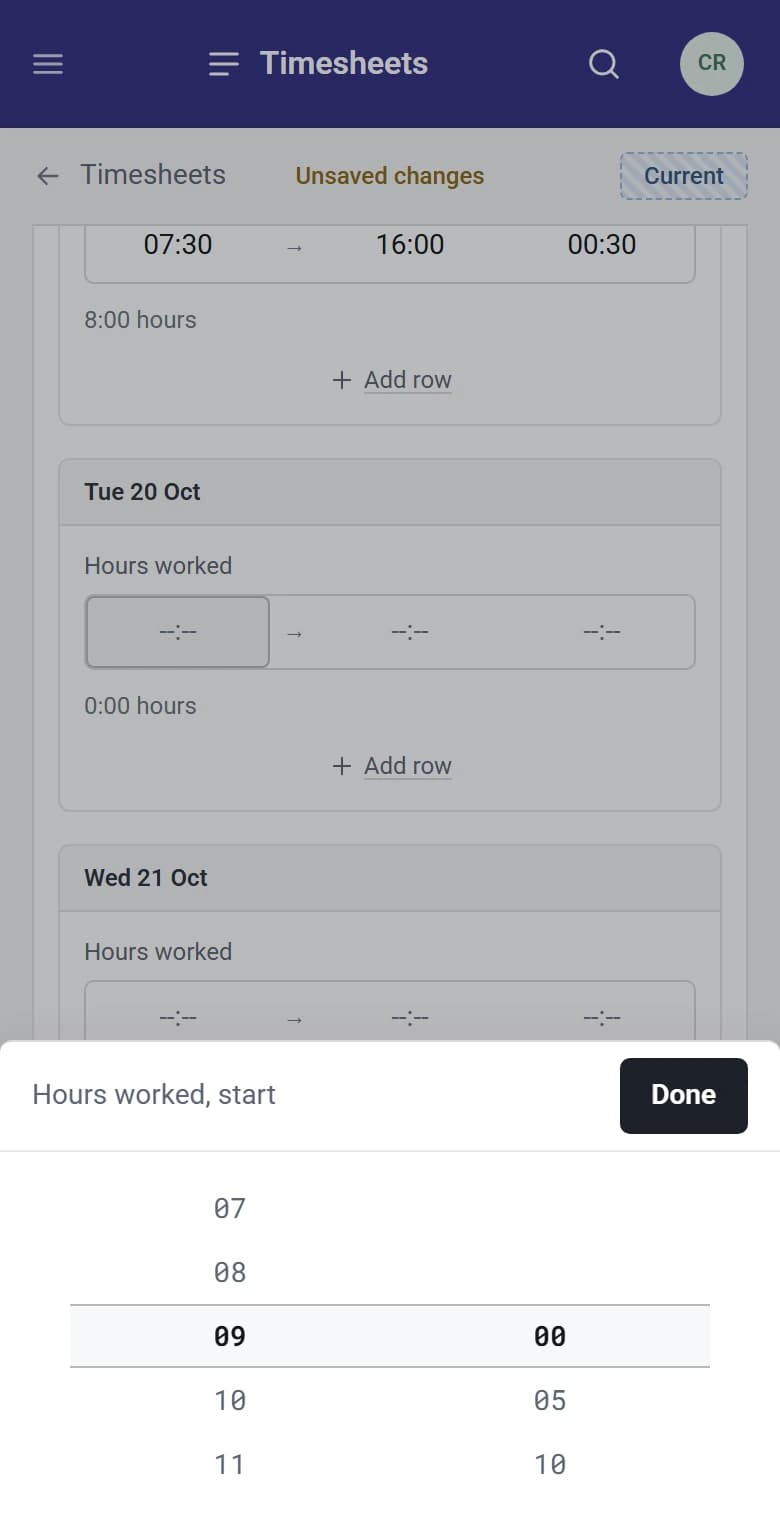
- A time wheel makes entering hours easy on a phone.
- Leave can be recorded, so nobody is chased for weeks they were away.
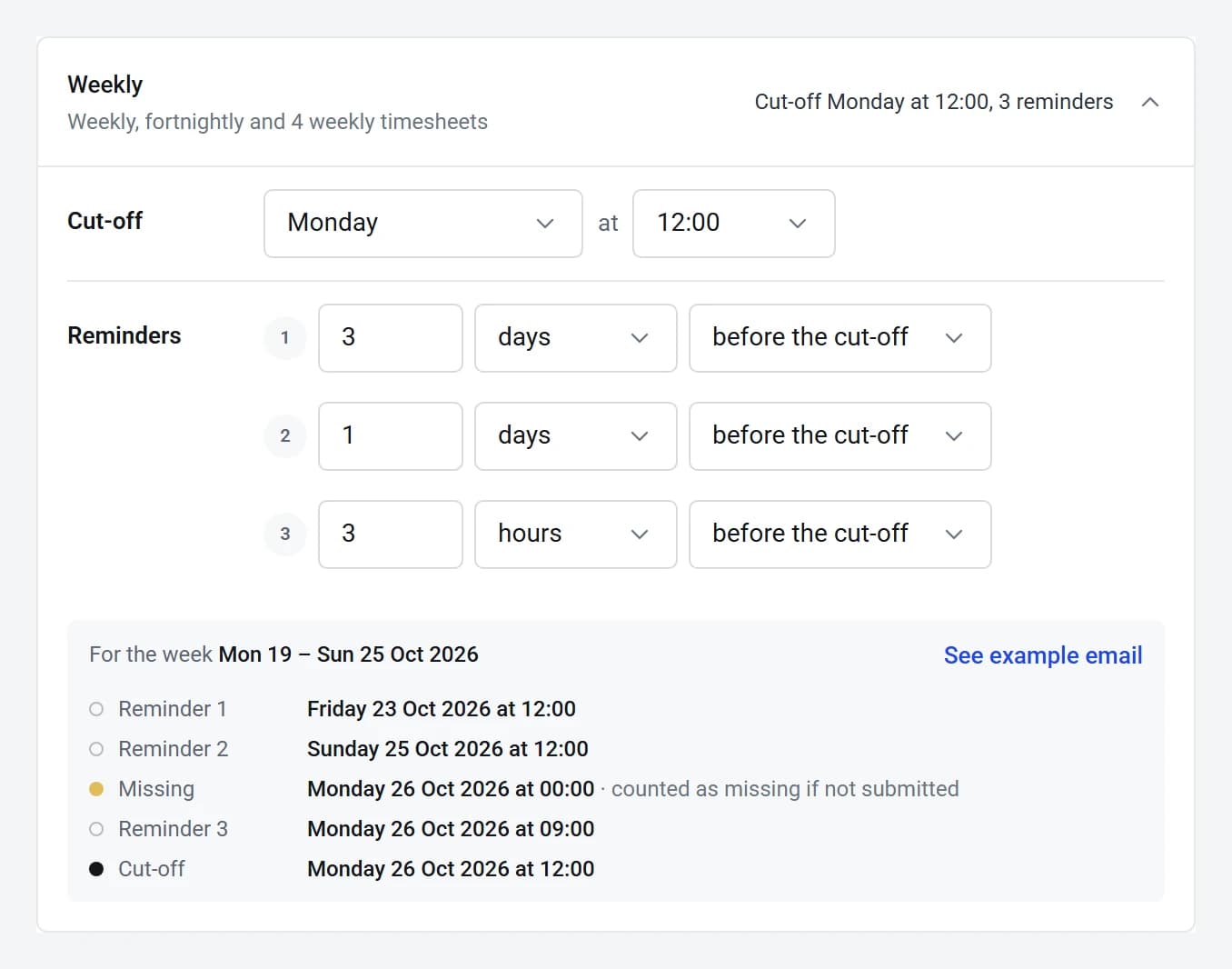
Chasing on autopilot
- Set a cut-off for each kind of period, then up to three reminders before or after it. Each one links straight to the right timesheet.
- Authorisers get up to three follow-ups of their own.
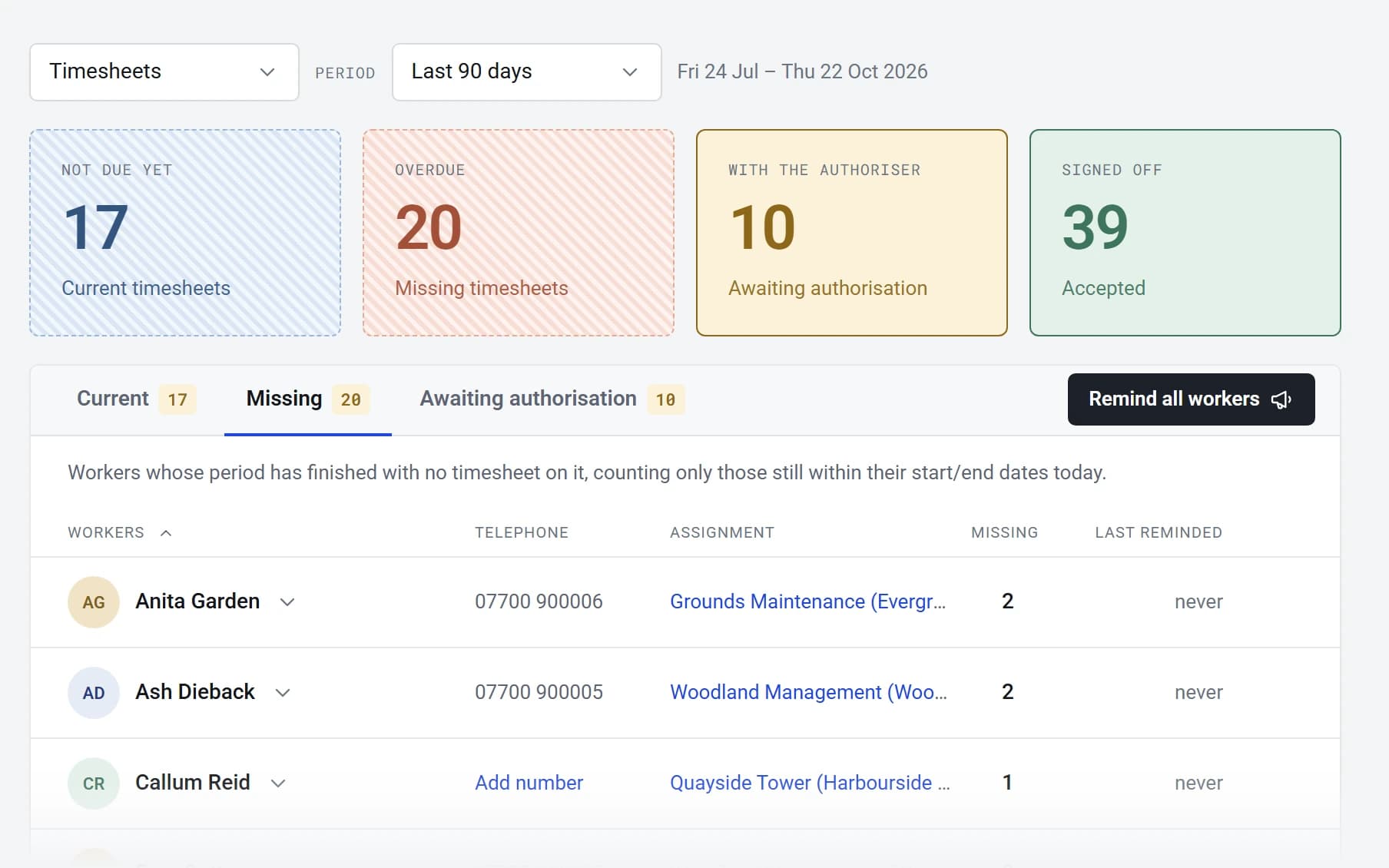
- The reminders page lists everything missing, current or waiting, so you can remind one person or all of them.
Out to payroll and Xero
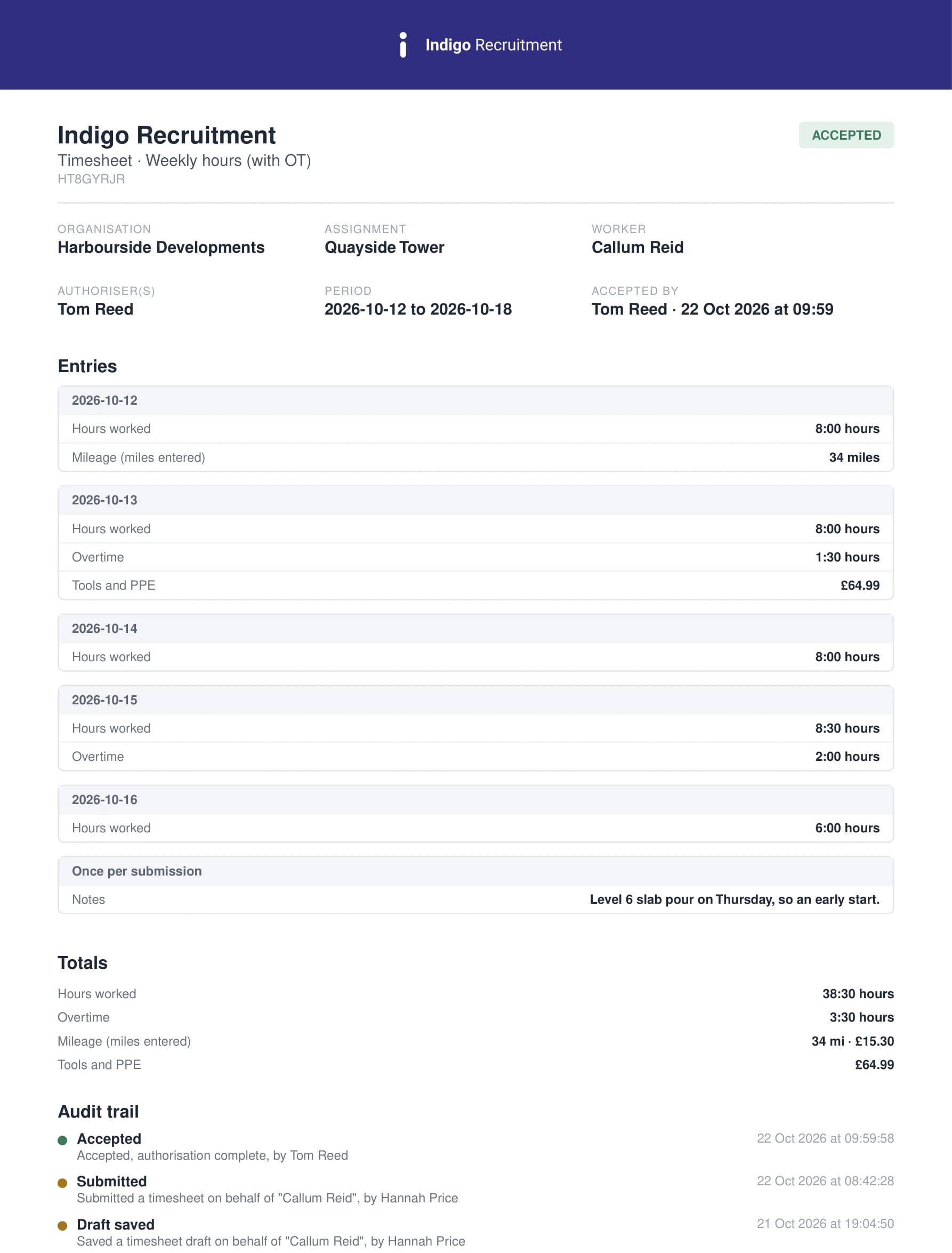
- Every timesheet has a branded PDF with its full audit trail.
- Download lists as Excel or CSV, in summary or one line per day, with pay and charge totals, or a zip of PDFs.
- Accepted timesheets can be copied automatically to your payroll inbox.
- Send approved time to Xero as draft invoices for each client, with the timesheets attached. Anything billed is marked so it is never billed twice.
You stay in control
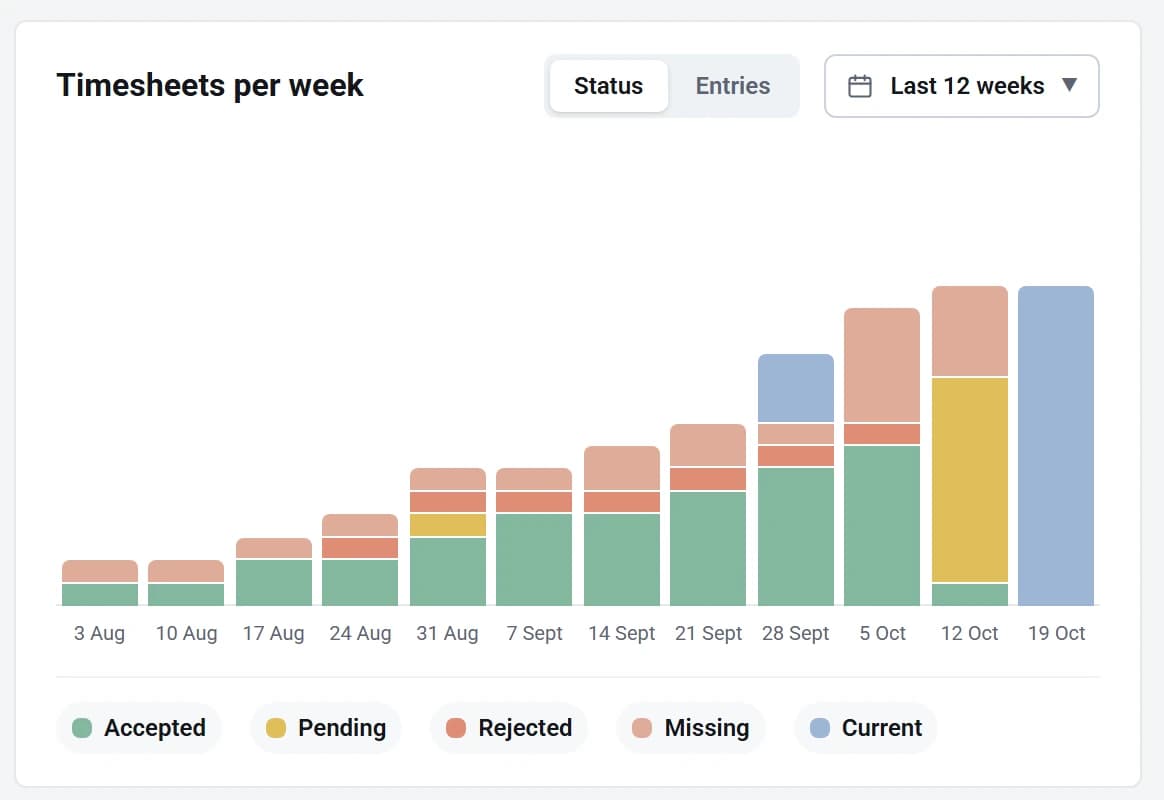
- See every week at a glance: accepted, pending, sent back and still missing.
- Fill in a timesheet for a worker, or approve on a client’s behalf if you hold that permission.
- Step an approval back, or return a timesheet to draft.
- Approved timesheets are locked, and billed ones cannot be unpicked.
Also included
Any pattern of work
- Daily, weekly, fortnightly, 4-weekly or monthly periods, with your own week start day.
- Split weekly timesheets at the month end for monthly payroll.
- Start, finish and break; total hours; or days in halves, quarters, fifths or tenths.
- Night shifts past midnight, and time in 1 to 30 minute steps.
Templates you build
- Ready-made weekly hours, weekly day rate and monthly day rate templates, and overtime versions of the weekly ones.
- Or build your own, with fields per day or once per timesheet.
- Extra rows such as overtime appear only on the days they are needed.
- Mileage and receipts can sit on the same timesheet.
Rates that stay put
- Pay and charge rates per worker, one at a time or in bulk, with account codes.
- Rates lock the moment a timesheet is sent, so a later change never rewrites approved work.
Questions buyers ask
Do my clients need to sign in?
Yes. Each authoriser has their own login, or can use their Google or Microsoft account. Every email has a button straight to the timesheet, and they see only their own workers.
Can workers use their phone?
Yes. SaveTrees runs in the browser on any phone, with nothing to install. Workers fill in their week with the time wheel, add mileage and receipts, and send it from wherever they are.
Can I fill in timesheets for my workers?
Yes. An admin can add a timesheet for any worker, fill it in and send it for authorisation, which helps when someone sends their hours by email or on paper. The audit trail shows it was done on their behalf.
What about overtime and night shifts?
Add an overtime field to the template and it only appears on the days someone adds it, with its own pay and charge rate. Night shifts can run past midnight, and the hours are worked out for you.
What if a client approves something by mistake?
An admin can reopen an accepted timesheet and send it back to the worker to correct, as long as it hasn’t been billed. Every step is kept in the audit trail.
How does it reach payroll?
However your payroll team likes it: a copy of each timesheet by email as soon as it’s accepted, a spreadsheet emailed on a schedule, or a download whenever you need one.
Pricing
Pay only for workers who record time that month. The first is free, then from £5 down to £1 per worker per month.
See pricingExpenses
Snap the receipt, plot the journey, and rebill approved expenses through Xero.
Explore expensesDocuments
Right to work, ID and certificates, collected, approved and kept in date.
Explore documents
Set up your branded portal in five minutes
Free for one worker, forever. No contract, no card, no set-up fees.